Adia Provider Portal — a clinician's workspace for iPhone and iPad. One unbroken flow from the moment a doctor sits down across from a patient to the moment the right lab tests are ordered — filtered by what that patient's insurance will actually cover. I owned the mobile direction while a separate team built the web version.
Context
Adia Provider Portal lives on three platforms — web, iPhone, iPad — and is sold to clinics and labs primarily in the US, where insurance coverage drives what a physician can actually order. The web side was being built in parallel by another team of designers. My slot was the mobile direction: end-to-end ownership of iPhone and iPad, from the first interview through final spec.
The clinical session looks simple from outside — doctor meets patient, doctor orders tests — but inside it carries everything: the patient's history, the chief complaint, ICD-10 diagnoses, a ranked set of lab panels that confirm those diagnoses, and the insurance gate that quietly decides which of those panels can actually be ordered. The product had to compress that into something a doctor could run on a screen they hold in one hand without losing their eyes from the person in front of them.
Where I started
Medical software is hard not because the screens are complex but because the work behind them is. Before drawing anything I needed to actually understand what a provider does in a session, where the friction lives in the tools they already use, and how the US insurance machinery shapes what they can prescribe. Three research tracks ran in parallel.
Three pictures the research drew
Three findings recurred across the interviews, the audit and the insurance literature. The product had to take all three as ground truth.
Decision 1 — one flow, two devices
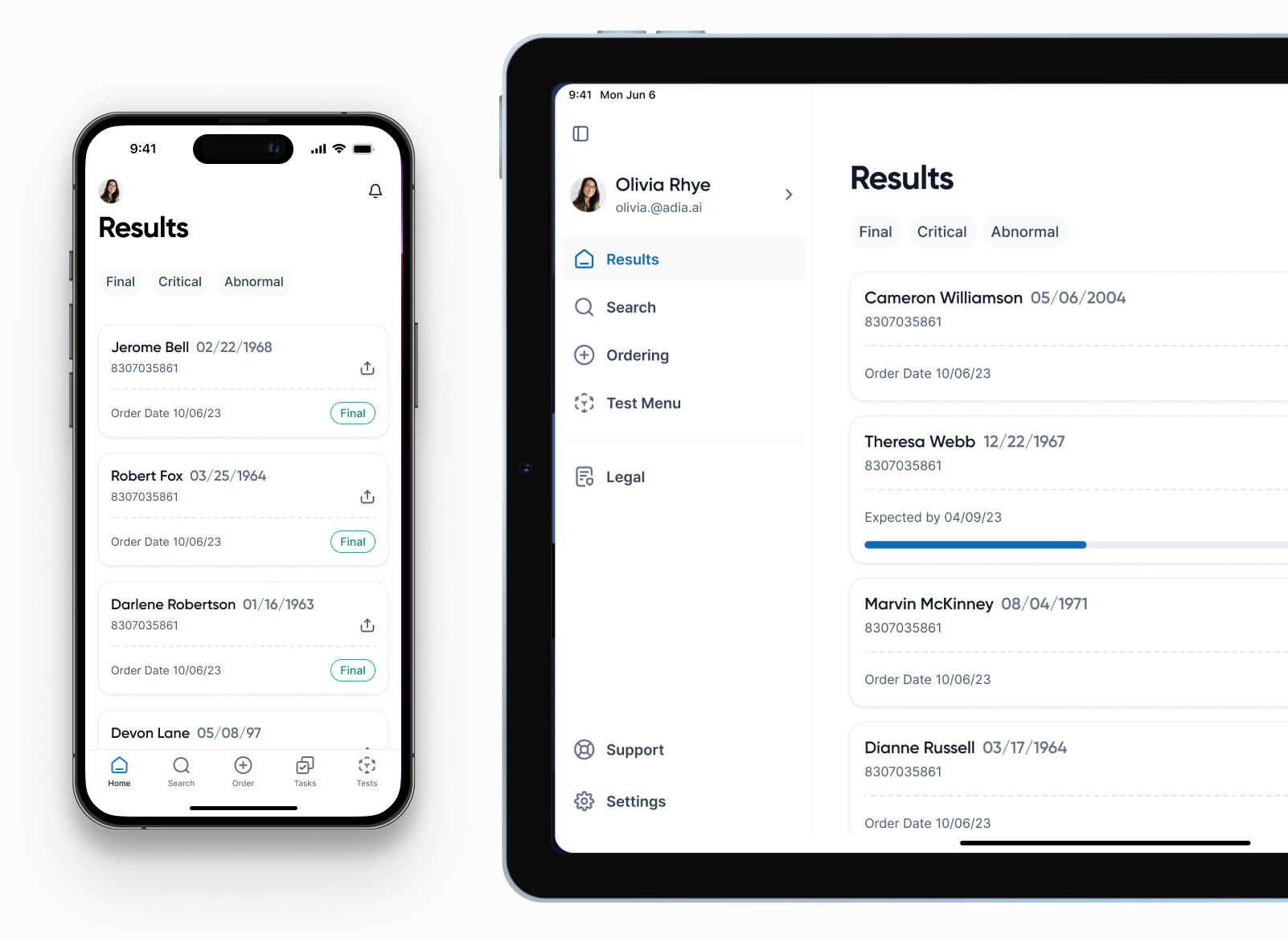
iPhone and iPad share the same session, the same components, the same data — but each device gets the layout that matches how it's actually used. On iPhone the doctor works one-handed during the patient meeting itself: one column, a five-tab bar (Home, Search, Order, Tasks, Tests), sheets that open exactly to the depth the current step needs. On iPad the same flow expands into a sidebar plus side-by-side columns — patient details on one side, ordering info on the other — so what was a sequence on the phone collapses into a single glance in the exam room.
Decision 2 — diagnosis-driven test ordering
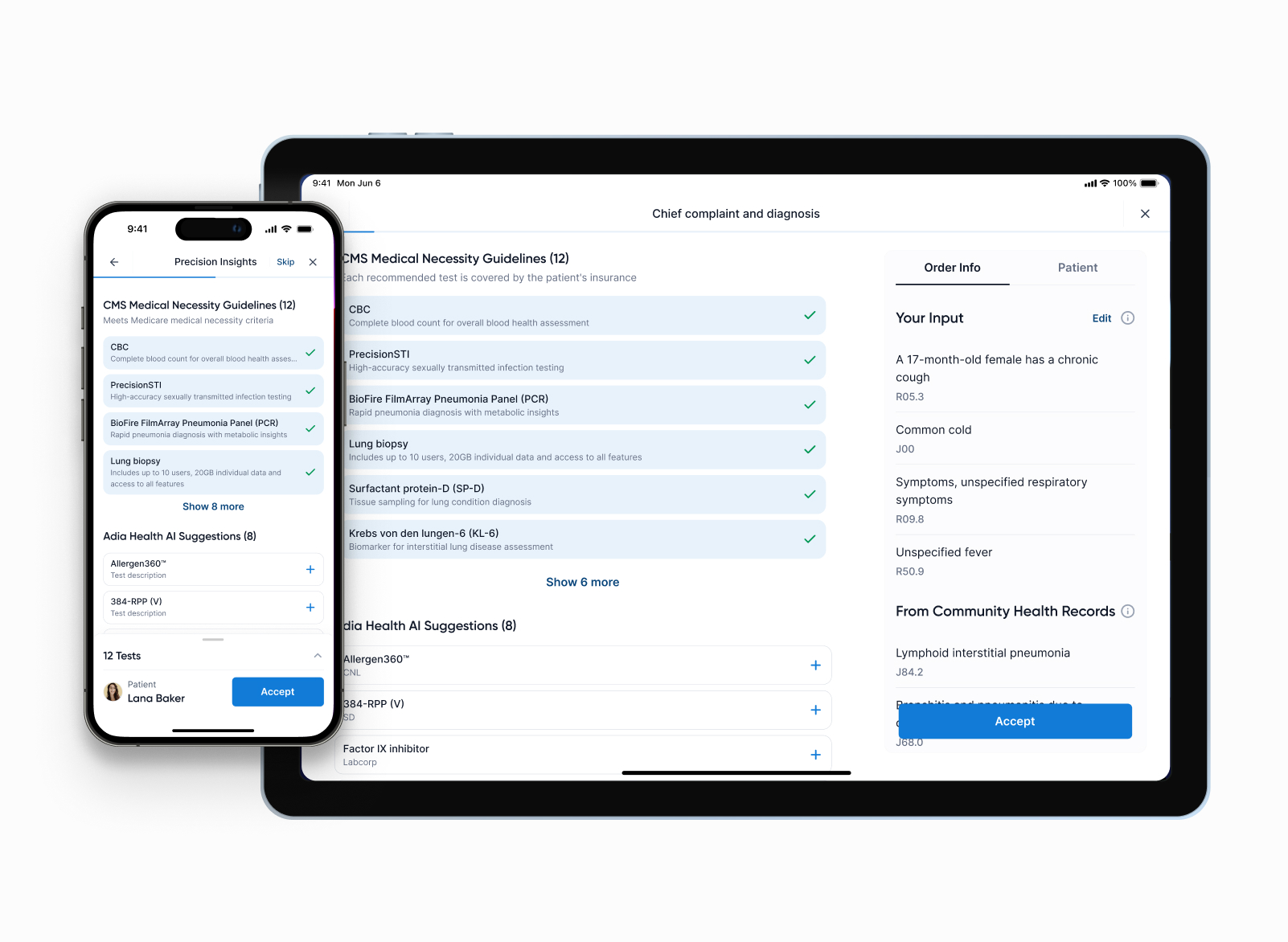
The hardest interface problem was the mapping from chief complaint to lab panels. The provider types or selects ICD-10 diagnoses; the Adia Health AI layer maps those to a ranked set of relevant lab panels — CBC, PrecisionSTI, respiratory panels, biopsies — and the insurance filter immediately marks which of them are covered for this specific patient. The clinician sees the reasoning at a glance and accepts, edits or skips in a single tap — no leaving the patient's eye line.
Decision 3 — result review as its own surface
Reviewing incoming results isn't a tail of ordering; it's a different cognitive task and it deserved its own screens. The Results section opens to a list filtered by three signals providers actually look for: Final (the result is complete), Critical (values outside life-safe thresholds) and Abnormal (out of reference range but not critical). Everything else is one tap away but never on top. The detail view holds the specific values, the patient's prior measurements on the same test, and a single line of context — what the value means in plain language.
Decision 4 — insurance check is in the order, not after it
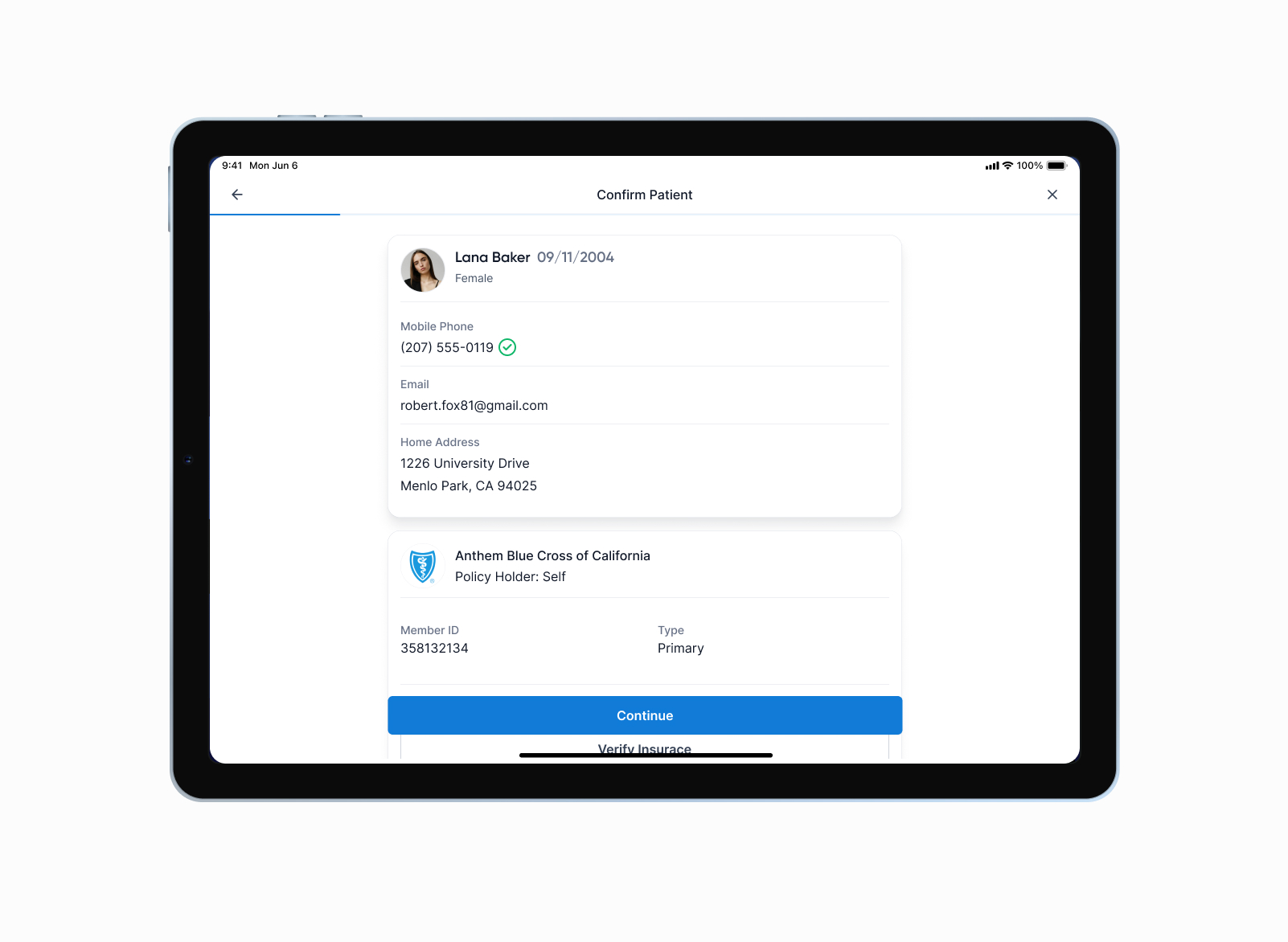
The biggest source of friction in legacy clinical tools is exactly this: provider picks a test, hits order, gets a denial back hours later, has to start over. We moved coverage into the choice itself. Every test in the ranked list shows whether it's covered for this patient's plan, before the provider commits. When prior authorisation is needed, the form is one step inside the same flow — not a separate task that comes back days later through a different surface.
What shipped
One product, two surfaces, one set of components — same session shape on whichever device is closer to the patient. The device picks the layout; the workflow stays the same.
- Unified session flow across iPhone and iPad — same components, two layouts
- Confirm Patient with insurance verification built into the very first step
- ICD-10 diagnosis input with prior history from community medical records
- AI-ranked test suggestions, filtered inline by what insurance covers
- Results section with Final / Critical / Abnormal filters and historical comparison
- Specimen tracking and order history on one surface
- Quiet default state, progressive disclosure through sheets
In clinical tools, restraint is the feature. Every click we removed was a second returned to the patient, not to the screen.
What I carry forward
Two things that travelled out of Adia Provider Portal into every project after it.